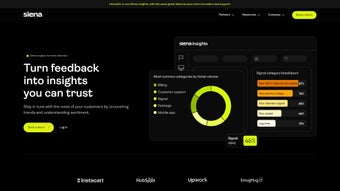

Download Idiomatic – AI‑Powered Customer Feedback Analysis & Insight Platform
Overview: Turning Raw Feedback into Actionable Intelligence
Idiomatic is an advanced customer intelligence platform that leverages artificial intelligence to transform unstructured feedback into clear, actionable insights. In today’s hyper‑connected market, businesses collect feedback from a multitude of sources—surveys, app store reviews, social media mentions, and support tickets. While the volume of data is growing, the ability to quickly interpret sentiment, pinpoint pain points, and understand the “why” behind each comment often lags behind. Idiomatic bridges that gap by applying natural language processing (NLP) and custom‑trained sentiment models that go beyond simple keyword counting. The platform automatically detects emerging trends, ranks issues by impact, and surfaces the underlying drivers of customer satisfaction or dissatisfaction.
What truly sets Idiomatic apart is its focus on contextual intelligence. Instead of presenting a flat sentiment score, the system highlights nuanced emotions, distinguishes between feature‑specific praise and overall brand perception, and even quantifies the financial impact of recurring issues. Teams across customer support, experience design, and product development can instantly access the data they need to prioritize fixes, allocate resources, and measure the ROI of improvements. By eliminating the manual effort of text analytics, Idiomatic accelerates the feedback loop, reduces operational costs, and empowers organizations to build products that genuinely resonate with users. The platform’s secure cloud architecture, GDPR‑compliant data handling, and flexible deployment options make it suitable for startups and enterprises alike, ensuring that every piece of feedback—whether a five‑star review or a terse tweet—contributes to a smarter, data‑driven decision‑making process.
Key Features that Power Seamless Feedback Management
- AI‑Generated Summaries: Instantly receive concise overviews of large feedback batches, highlighting major themes and outlier comments.
- Custom Data Labeling: Tailor the classification schema to match your business language, allowing the AI to learn industry‑specific terminology.
- Sentiment Analysis Models: Choose from pre‑built models or train bespoke models that capture subtle sentiment shifts across channels.
- Multi‑Source Integration: Pull data from surveys, app reviews (iOS & Android), social platforms, and ticketing systems in a single dashboard.
- Automated Ticket Routing: Route high‑priority issues to the right support agents based on sentiment severity and product area.
- Custom Reporting & Dashboards: Build role‑based reports that visualize trends, cost per ticket, and impact on NPS or CSAT.
- Cost Calculations per Ticket: Quantify the financial burden of each support request, helping leadership make data‑driven budgeting decisions.
- Real‑Time Alerts: Receive instant notifications when a sudden spike in negative sentiment is detected.
- Secure Cloud Architecture: All data is encrypted at rest and in transit, complying with GDPR, CCPA, and ISO‑27001 standards.
- Scalable Pricing Model: Flexible subscription tiers that grow with your feedback volume, ensuring you only pay for what you need.
Beyond the headline capabilities, Idiomatic hides a suite of workflow‑enhancing tools that often go unnoticed until they become indispensable. The “Insight Builder” lets analysts drag‑and‑drop sentiment tags directly onto product roadmaps, creating a visual link between the customer voice and development priorities. The “Feedback Heatmap” visualizes sentiment intensity across geographic regions, enabling global teams to address localized concerns with speed. Additionally, the platform offers batch export options, API‑first connectivity for custom integrations, and a robust role‑based access control system that safeguards sensitive data while empowering cross‑functional collaboration. Each feature is designed to reduce manual effort, improve analytical accuracy, and deliver a single source of truth for anyone involved in the customer experience journey.
Installation & Usage: Getting Started in Minutes
Step‑by‑Step Installation Guide
- Create an Account: Visit the Idiomatic website, click “Sign Up,” and fill in your business details. A verification email will be sent to confirm your domain.
- Select Your Deployment: Choose between the cloud‑hosted SaaS option (recommended for most teams) or the on‑premises Docker image for highly regulated environments.
- Connect Data Sources: Use the built‑in connectors to import CSV surveys, link your Google Play and Apple App Store accounts, or integrate with Zendesk, Freshdesk, and ServiceNow via API keys.
- Configure AI Models: Start with the default sentiment model or upload a small labeled dataset (e.g., 500 annotated comments) to train a custom model. The platform walks you through the labeling process with an intuitive UI.
- Set Up Workflows: Define rules for automated ticket routing, email alerts, and dashboard refresh intervals. You can also schedule nightly data syncs for large volumes.
- Invite Team Members: Assign roles (Admin, Analyst, Viewer) and configure SSO (Okta, Azure AD) for secure access.
- Launch Your First Insight: Click “Generate Summary” on any imported dataset. Within seconds, Idiomatic presents a high‑level overview, key drivers, and suggested actions.
Everyday Usage Tips
Once installed, Idiomatic becomes a central hub for all feedback‑related activities. Analysts typically start their day by reviewing the “Live Sentiment Dashboard,” which displays real‑time sentiment trends and highlights any spikes in negative sentiment. The “Insight Builder” allows you to tag specific comments with custom labels (e.g., “Feature Request,” “Bug,” “Pricing Concern”) and instantly see how those categories affect overall scores.
Support managers rely on the “Automated Ticket Routing” panel to monitor ticket queues. By assigning severity thresholds, the system automatically escalates high‑impact tickets to senior agents, ensuring quick resolution. Product managers love the “Custom Reporting” feature: they can schedule weekly PDF reports that include sentiment breakdowns, cost‑per‑ticket calculations, and actionable recommendations, which are then automatically emailed to stakeholders.
For organizations with strict compliance requirements, the on‑premises deployment offers full control over data residency. The Docker image can be orchestrated with Kubernetes, and logs are stored locally for audit purposes. Whether you’re a small startup or a Fortune 500 enterprise, Idiomatic’s flexible installation options and intuitive UI make it possible to start extracting value from customer feedback in under an hour.
Conclusion: Compatibility, Pros & Cons, FAQ & Call to Action
Compatibility and System Requirements
Idiomatic is a web‑based SaaS platform that runs on any modern browser (Chrome, Edge, Firefox, Safari) across Windows, macOS, Linux, and mobile devices. For teams that prefer a native experience, responsive mobile views are available for iOS and Android, allowing agents to monitor sentiment and respond to tickets on the go. The on‑premises Docker container supports Ubuntu 20.04+, CentOS 8+, and can be deployed behind corporate firewalls for added security.
Pros
- AI‑driven sentiment analysis that captures nuance beyond simple positive/negative scores.
- Seamless integration with major data sources (surveys, app stores, ticketing systems).
- Customizable models and labeling to fit industry‑specific language.
- Automated ticket routing reduces manual triage effort.
- Real‑time alerts and heatmaps help quickly identify emerging issues.
- Secure, GDPR‑compliant architecture with end‑to‑end encryption.
- Scalable pricing that adapts to feedback volume.
- Extensive reporting options, including cost‑per‑ticket calculations.
Cons
- Initial model training may require a small labeled dataset for optimal accuracy.
- On‑premises deployment needs Docker/Kubernetes expertise.
- Advanced custom reporting features are only available on higher‑tier plans.
- Learning curve for non‑technical users when setting up complex routing rules.
Frequently Asked Questions
How does Idiomatic handle data privacy and compliance?
Idiomatic uses AES‑256 encryption for data at rest and TLS 1.3 for data in transit. The SaaS version stores data in EU‑ or US‑based data centers based on your selection, and all processing complies with GDPR, CCPA, and ISO‑27001. For highly regulated industries, the on‑premises Docker deployment allows you to keep all raw feedback behind your own firewall, giving you full control over retention policies and audit logs.
Can I use Idiomatic with existing ticketing tools like Zendesk or ServiceNow?
Yes. Idiomatic includes native connectors for Zendesk, Freshdesk, ServiceNow, and other popular platforms. You simply generate an API token in your ticketing system, paste it into Idiomatic’s integration settings, and map fields such as ticket status, priority, and customer ID. Once connected, sentiment scores and AI‑generated summaries are automatically attached to tickets, and routing rules can be applied directly from the Idiomatic dashboard.
Do I need a data science team to train custom sentiment models?
No. Idiomatic’s “Custom Model Builder” provides an intuitive UI where you can upload a small set of labeled examples (as few as 200‑500 comments). The platform’s auto‑ML engine handles the heavy lifting, training a model that adapts to your industry jargon. For organizations with larger datasets or specific performance goals, you can also upload pre‑trained models via the API.
Is there a free trial or demo available?
Idiomatic offers a 14‑day free trial for the cloud‑hosted version, giving you full access to all core features, including AI summaries, multi‑source integration, and real‑time alerts. You can also request a personalized on‑premises demo where a specialist walks you through deployment, security configurations, and model customization tailored to your specific use case.
What support options are available after purchase?
All paid plans include 24/7 email support and access to a dedicated knowledge base. Premium tiers receive priority phone support, a dedicated account manager, and quarterly business reviews to help you extract maximum value from your feedback data.
Ready to Transform Your Feedback into Growth?
Idiomatic combines the power of AI with a user‑friendly interface, making sophisticated sentiment analysis accessible to every team member—from frontline support agents to senior product strategists. By consolidating disparate feedback channels, delivering instant, context‑rich summaries, and automating the routing of critical issues, the platform turns noisy data into clear, strategic actions that boost customer satisfaction and bottom‑line revenue.
Take the next step now: Click the button below to start your free trial, download the on‑premises installer, or contact our sales team for a personalized demo. Your customers are already talking—let Idiomatic help you listen smarter.



.png)



